
Color Grid for Microsoft Dynamics 365
Apply conditional formatting to Dynamics 365 grids. Dynamically highlight records based on any criteria — no code required.
What is Color Grid?
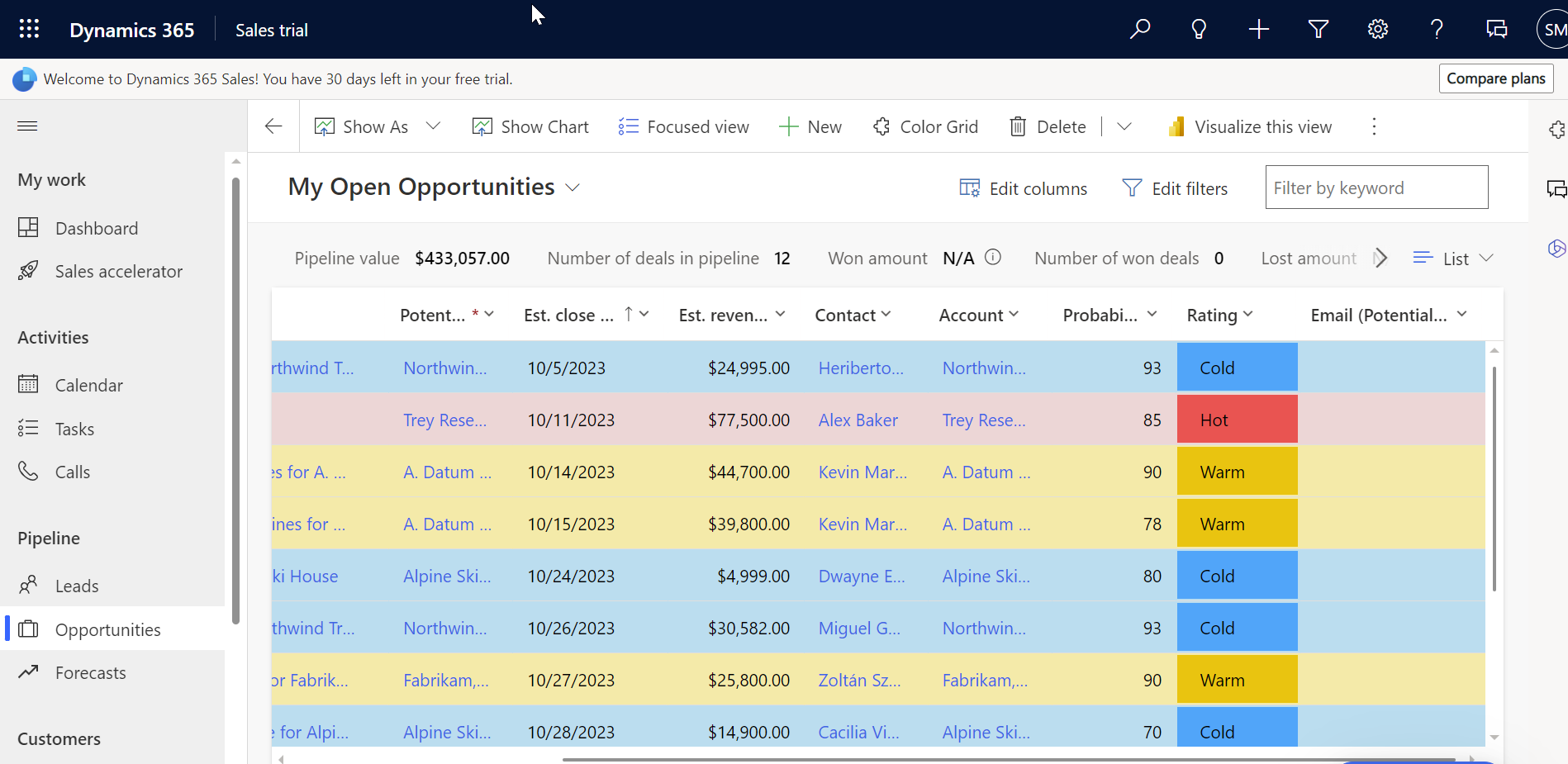
Color Grid is a powerful solution that empowers you to apply conditional colorizing to Microsoft Dynamics 365 grids. You can effortlessly apply conditional formatting to records displayed in any grid, dynamically highlighting data based on specific criteria.
Cell & Row Colors
Apply background and font colors to cells or entire rows
Multiple Rules
Define multiple configurations with rank-based priority
Text Formatting
Bold, italic, prefix, and suffix options
Model-Driven App
Includes dedicated Color Grid configuration app
Example Scenarios
Discover how organisations use Color Grid to improve data visibility and decision-making
Priority Levels
Colour cases based on high, medium, and low priority for instant triage.
Due Dates
Highlight overdue activities in red and those due soon in yellow.
Sales Stages
Colour opportunities by stage: prospecting, negotiation, won, or lost.
Aging Leads
Highlight leads in the system too long that need follow-up attention.
Revenue Targets
Flag opportunities above or below revenue thresholds at a glance.
SLA Breaches
Highlight cases close to breaching service level agreements.
Lead Source
Colour leads by source: website, referral, event, or campaign.
Customer Types
Differentiate new customers, repeat customers, and VIPs visually.
Custom Fields
Apply formatting based on any custom fields in your organisation.
Color Grid Config Entity
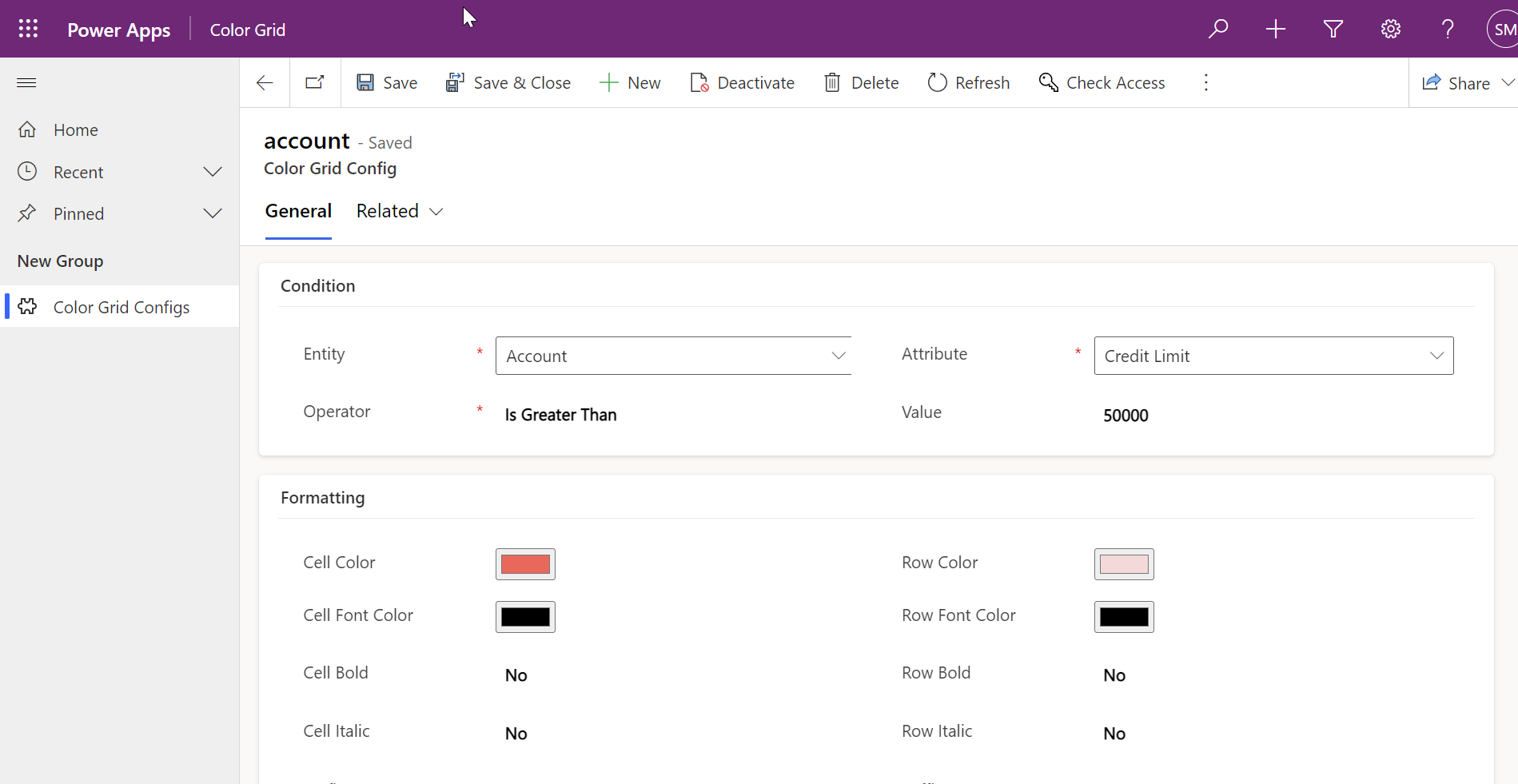
The Color Grid solution includes a dedicated model-driven app where you define conditions and formatting rules in the Color Grid Config entity.
Condition Settings
| Entity | Select entity to apply configuration |
| Attribute | Select attribute of the selected entity |
| Operator | Select conditional operator |
| Value | Select value if applicable |
Formatting Options
| Option | Description |
|---|---|
| Cell Color | Background colour for matching value cell |
| Row Color | Background colour for matching value row |
| Cell Font Color | Font colour for the cell |
| Row Font Color | Font colour for the row |
| Cell Bold | Make cell font bold |
| Row Bold | Make row font bold |
| Cell Italic | Make cell font italic |
| Row Italic | Make row font italic |
| Prefix | Text to add before the cell value |
| Suffix | Text to add after the cell value |
| Rank | Priority order for multiple configurations |
Simple Configuration
With Color Grid Config, you specify the different conditions to match and the formatting to apply on selected records. No coding required.
- Intuitive drag-and-drop rule builder
- RGB color picker for precise color matching
- Multiple conditions per rule supported
- Preview changes before publishing
How It Works
Select Your Entity
Choose which Dynamics 365 entity you want to format
Define Your Conditions
Set up rules using our supported operators
Choose Your Colors
Pick any color using the RGB selector
See Results Instantly
Your records are now color-coded!
Simple Installation
Get Color Grid up and running in your Dynamics 365 environment in minutes
Download Solutions
After purchase, you'll receive two solution files via email:
Controls_1_0_0_0_managed.zip- Controls SolutionColorGrid_1_0_0_1_managed.zip- ColorGrid Solution
Navigate to Power Apps
Go to make.powerapps.com and select your environment.
Import Solutions
Install both solutions in the specified order: Controls Solution first, then ColorGrid Solution.
Open Color Grid App
The solution includes a Color Grid model-driven app where you can define configurations in the Color Grid Config entity.
Supported Conditional Operators
Color Grid supports a comprehensive set of operators for strings, numbers, and dates
String Operators
Text-based conditions- Equals
- Does not equal
- Contains
- Does not contain
- Begins with
- Does not begin with
- Ends with
- Does not end with
- Contains data
- Does not contain data
Numeric Operators
Number comparisons- Equals
- Does not equal
- Is greater than
- Is greater than or equal to
- Is less than
- Is less than or equal to
DateTime Operators
Date & time conditions- Today
- Yesterday
- Tomorrow
- Last 7 days
- Next 7 days
- Last week
- This week
- Next week
- Last month
- This month
- Next month
- Last year
- This year
- Next year
- Last X hours
- Next X hours
- Last X days
- Next X days
- Last X weeks
- Next X weeks
- Last X months
- Next X months
- Last X years
- Next X years
- On
- On or before
- On or before today
- On or after
- On or after today
- Older than X days
- Older than X weeks
- Older than X months
- Older than X years
One Price, Everything Included
No hidden fees, no per-user charges. Get Color Grid for your entire organization.
Color Grid License
- Per Dynamics 365 environment
- Unlimited users - no per-seat fees
- Lifetime updates - always stay current
- Email support included
- Works on all standard & custom entities
- Includes Color Grid model-driven app
- User guide documentation
Secure payment via Stripe
Trusted by 100+ Organisations
See how teams are using Color Grid to transform their Dynamics 365 experience
"Color Grid has transformed our CRM experience. Now we can quickly spot our hottest leads, making our sales efforts more effective. A game-changer!"

Sarah L.
Sales Manager"Color Grid brings life to our data. Visualising campaign performance and lead quality is a breeze. An essential tool for our marketing success."

John A.
Marketing Director"Color Grid's dynamic visualisation helps us track KPIs effortlessly, leading to smarter decisions across the business."

David M.
CEO"Our support team is more efficient with Color Grid. Prioritising tickets by severity is a snap, leading to improved customer satisfaction."

Lisa H.
Customer Support Manager"Implementing Color Grid was seamless and it has made our Dynamics 365 system more user-friendly. Our team loves the enhanced data organisation."

Michael S.
IT Administrator"Color Grid has been a revelation for our operations — streamlining processes, monitoring inventory, and optimising our supply chain visibility."

Alexandra P.
Operations ManagerFrequently Asked Questions
Ready to transform your Dynamics 365 grids?
Join 100+ organisations using Color Grid to highlight what matters most in Microsoft Dynamics 365.